Promises are a central component of asynchronous JavaScript. While the promise provides instructions for what to do when a given task completes, the rest of your code can chug merrily along without interruption or delay.
For example, I might want to fetch a large chunk of data from some API when my code first initiates. This might take a bit of time and I don’t want that to get in the way of the rest of my code, e.g., assigning event listeners to elements on a web page and the like. So, fetch() returns a promise that, if nothing goes wrong, is fulfilled. When it’s fulfilled, it returns a response from the API that is then available for further use.
Getting ahead of yourself
Since that promise might take a bit of time to fulfill, if you have further code that attempts to utilize the data from the fetch(), it is likely to throw an error or deliver an undesired result.
function fetchStuff(url) {
    return fetch(url, {
        headers: {
            Accept: "application/json"
        }
    });
};

const cardArray = [];

fetchStuff("https://netrunnerdb.com/api/2.0/public/cards")
.then((response) => {
    return response.json();
})
.then((result) => {
    return cardArray.push(...result.data);
});

console.log(cardArray);
In this code, when fetchStuff() is called, it returns a promise. When that promise is fulfilled, it spreads the data returned from the API to cardArray (what’s going on with those .thens? More on them in a bit).
I want cardArray, filled with data from the fetch() request, to get logged in the console.
But, what I get is an empty array.

The problem here is that my console.log(cardArray) grabbed cardArray before the promise from fetch() was fulfilled and, thus, before the data from the API was spread to cardArray.
Promise chains
To achieve my desired result, I can include my console.log() inside the promise chain.
When a promise is created, you can use .then to pass the data returned upon fulfillment of the promise to a function as an argument. Indeed, in the above code, I’ve already used this method to convert the data from the API into a usable format with response.json() and then passed the result of that on to be spread into cardArray.
I simply need to add a new link in that chain.
.
.
.

fetchStuff("https://netrunnerdb.com/api/2.0/public/cards")
.then((response) => {
    return response.json();
}).then((result) => {
    return cardArray.push(...result.data);
}).then(() => {
    return console.log(cardArray);
});
Here response is the raw data returned from the fetch(), which is processed into a usable format by response.json() and then, in that new format, passed to the next link in the promise chain as an argument, result, where it gets spread to cardArray. In the last link in the chain, console.log(cardArray) is called and, since this link in the chain is only activated once the previous links are complete, cardArray is sure to include the data from the API.
Note that cardArray.push(...result.data) creates a new array, replacing the array previously assigned to cardArray, and returns the length of the new array. Since the function in the last link of the chain takes no arguments, this returned value isn’t passed along to it.
Dependent promises
Things get a bit trickier when I’m waiting on two promises to be fulfilled and I want to complete a single task using the data from both. For example, maybe I want to combine the data from both promises into a single array. I might try to accomplish this as follows:
.
.
.

function combineArrays(array1, array2) {
    const combinedArrays = [...array1, ...array2];
    return console.log(combinedArrays);
};

const cardArray = [];

fetchStuff("https://netrunnerdb.com/api/2.0/public/cards")
.then((response) => {
    return response.json();
}).then((result) => {
    return cardArray.push(...result.data);
});

fetchStuff("https://netrunnerdb.com/api/2.0/public/prebuilts")
.then((response) => {
    return response.json();
}).then((result) => {
    const deckArray = [...result.data];
    return deckArray;
}).then((result) => {
    return combineArrays(cardArray, result);
});
Here there are two fetch() requests occurring and, as the final chain in the second promise chain, the data from the first fetch(), which is ultimately spread to cardArray, is combined, using combineArrays(), with the data from second fetch(), result.
The problem with this is that you get the wrong result some of the time.
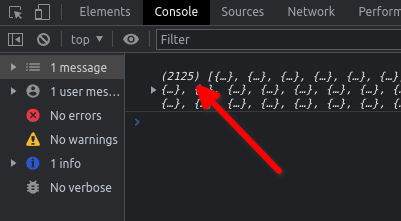
The array returned from the first fetch() has a length of 2119. The array returned from the second fetch() has a length of 6. So, when things work as I want, the resulting array has a length of 2125 . As you can see, that doesn’t always happen.

What causes this bug?
The time it takes for fulfillment of a promise is not constant. Sometimes it takes a bit more time and sometimes a bit less. When the first fetch() is speedy and beats the second fetch(), the data is ready in cardArray when combineArrays() is called. But when the first fetch() has even a bit of lag, the second fetch() completes first and cardArray is still empty when combineArrays() is called.
In this case, that happens about 10% of the time.
setTimeout
One solution to this problem would be to remove the combineArrays() from the promise chain and instead delay when that function is called by, oh, say one second.
.
.
.

fetchStuff("https://netrunnerdb.com/api/2.0/public/prebuilts")
.then((response) => {
    return response.json();
}).then((result) => {
    return deckArray.push(...result.data);
});

setTimeout(() => {
    return combineArrays(cardArray, deckArray);
}, 1000);
Using setTimeout(), the combineArray() function call is delayed until enough time has elapsed for both promises to have resolved.
This is not, however, ideal. First, one second is kind of arbitrary. Why not half a second? Why not two seconds? This is not a principled solution. Second, there is no guarantee that the amount of time you pick for the delay will always be enough, so you may not have eliminated the bug completely. Third, if you do eliminate the bug completely then, at least some of the time, you will delay the function call unnecessarily, increasing the load time of your code.
There has to be a better way!
Promise.all
There is! A better solution involves the use of Promise.all. This method bundles all the designated promises into a single, new promise. You can then include your desired function in the new promise chain.
In order to use this method, you need to assign you original promises to some variable. You then reference those promises with those variables when you implement Promise.all.
.
.
.

const deckArray = [];
const cardArray = [];

const fetchCards = fetchStuff("https://netrunnerdb.com/api/2.0/public/cards")
.then((response) => {
    return response.json();
}).then((result) => {
    return cardArray.push(...result.data);
});

const fetchDecks = fetchStuff("https://netrunnerdb.com/api/2.0/public/prebuilts")
.then((response) => {
    return response.json();
}).then((result) => {
    return deckArray.push(...result.data);
});

Promise.all([fetchCards, fetchDecks])
.then(() => {
    combineArrays(cardArray, deckArray);
});
Here the promises from the first and second fetch() requests are assigned to fetchCards and fetchDecks respectively. Those promises are then bundled together in Promise.all and, in the subsequent promise chain, combineArrays() is called when the bundled promise is completely fulfilled, no sooner and no later.
In fact, this method lets us eliminate the global variables entirely, in keeping with the principles of functional programming:
.
.
.

const fetchCards = fetchStuff("https://netrunnerdb.com/api/2.0/public/cards")
.then((response) => {
    return response.json();
}).then((result) => {
    return result.data;
});

const fetchDecks = fetchStuff("https://netrunnerdb.com/api/2.0/public/prebuilts")
.then((response) => {
    return response.json();
}).then((result) => {
    return result.data;
});

Promise.all([fetchCards, fetchDecks])
.then((values) => {
    const combinedArray = [...values[0], ...values[1]];
    return console.log(combinedArray);
});
The data the argument that gets passed into the function inside .then(), values, is an array with two elements: the first is the final value returned by fetchCards and the second is the final value returned by fetchDecks.
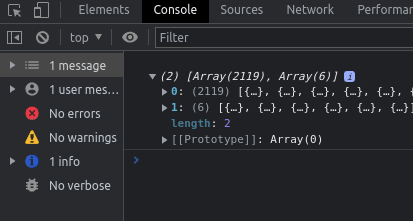
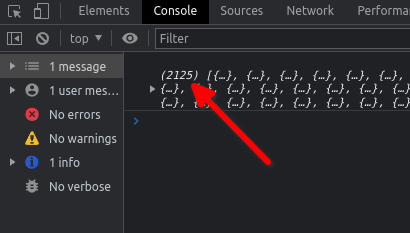
So, [...values[0], ...values[1]] is an array with the final returned value of the first fetch() and the final value of the second fetch() spread to it. Not only did we eliminate the global variables, we also did away with the combineArrays() function!
Conclusion
Working with promises, promise chains, and Promise.all can be a bit difficult at first. There’s a lot to keep tabs on and it’s easy to get lost in all those chains. But after some practice, you’ll find these to be powerful tools in your toolbox.
 Tim Loughrist