The situation: you’re building a single-page application in React using client-side routing.
The goal: to apply styling to an element as long as a user is on a particular “page”.
Imagine that you have a navigation bar across the top of your app with navlinks to the app’s various “pages”. You want the navlink for the current page to stand out so users can quickly see where they are in the app.
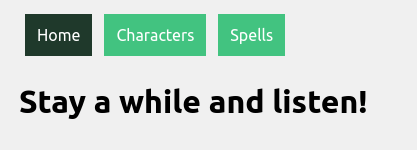
The simplest way to deal with this is to apply conditional styling to the navlink when the navlink is active.
.navlink {
    display: inline-block;
    padding: 12px;
    margin: 0 6px 6px;
    background: #3cc47c;
    text-decoration: none;
    color: white;
}

.navlink:active {
    background: #1e392a;
}
The problems: first, if a user navigates to a page through some means other than clicking on the navlink, the navlink will not become active. Second, if the user refreshes the page, the navlink will cease to be active.
The solution: The useLocation hook returns information about the app’s current path. Once you have that, it is a simple matter to conditionally add classes to the navlinks.
import React from "react";
import { NavLink, useLocation } from "react-router-dom";
import './Banner.css';

function Banner() {

    return (
        <div className="main">
            <NavLink
                id="home"
                to="/"
                exact
                className={useLocation().pathname === "/" ? "navlink active" : "navlink"}
            >
                Home
            </NavLink>
            <NavLink
                id="characters"
                to="/characters"
                exact
                className={useLocation().pathname === "/characters" ? "navlink active" : "navlink"}
            >
                Characters
            </NavLink>
            <NavLink
                id="spells"
                to="/spells"
                exact
                className={useLocation().pathname === "/spells" ? "navlink active" : "navlink"}
            >
                Spells
            </NavLink>
        </div>
    );
};

export default Banner;
.navlink {
display: inline-block;
padding: 12px;
margin: 0 6px 6px;
background: #3cc47c;
text-decoration: none;
color: white;
}
.active {
background: #1e392a;
}And that’s it: you’ve got conditional styling that applies to an element so long as the user remains on a particular page.
 Tim Loughrist